Skip to content
LIVE NOWBuildroom—FREE EDITION 1.8.5 includes 3B · 4B · 7B · 8B. Same price: $0.
Mainely CodeAI anywhere. Governed everywhere.
Mainely Code Buildroom

If you can dream it, we will help you Build it.

AI coding with receipts.

The local-first software engineer of the Mainely Code family. Start with Buildroom—FREE EDITION 1.8.5 today, then follow the path toward more capable proof-driven engineering in LITE and ADVANCED.

See the Autopilot development preview
MAINELY CODE BUILDROOM FREE 1.8.5 · LIVE
FREE.

More possibilities. No price tag.

3 B Parameters
4 B Parameters
7 B Parameters
8 B Parameters

3B, 4B, 7B, and 8B local model options are included in the current FREE release.

Local-first agentic AI coding

More than a suggestion.
A workflow you can review.

Buildroom brings local model choices, repository work, reviewed changes, and verification receipts into a Windows application. The goal is useful software engineering with visible boundaries—not an unbounded agent session.

Start with FREE EDITION on compatible hardware. Read what agentic coding means, then compare the edition roadmaps. FREE and early Autopilot workflows continue to be hardened; a future feature is not a current-release promise.

Capability should not feel like a closed door

Understand it.
Try it. Build on it.

Buildroom starts with real work: understanding a project, untangling an error, drafting a useful script, or shaping a small idea into code.

The broader engineering direction goes further: clear scope, reviewable changes, verification, proof, and recovery. Different editions deliver different levels of that experience. A model sounding confident is not the same as a job being finished.

Announcement · September 5, 2026

We are making FREE a bigger deal.

3B, 4B, 7B, and 8B are included in FREE EDITION 1.8.5. Read the update.

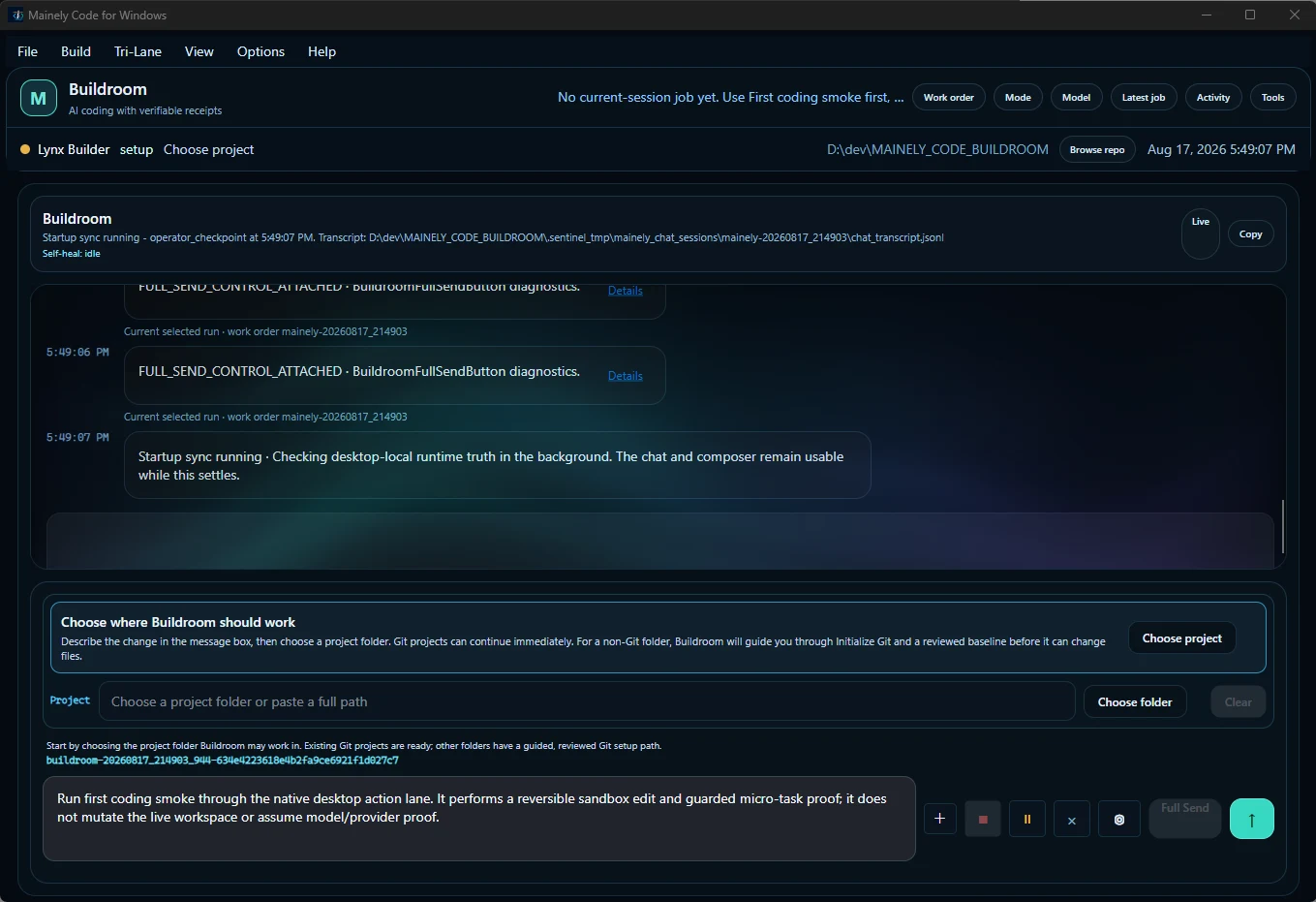
Buildroom development workspace showing repository selection, runtime status, and chat
Buildroom development interface preview. Appearance and capabilities vary by edition and release. Select to enlarge.
Actual FREE EDITION interface

Buildroom, as it actually opens.

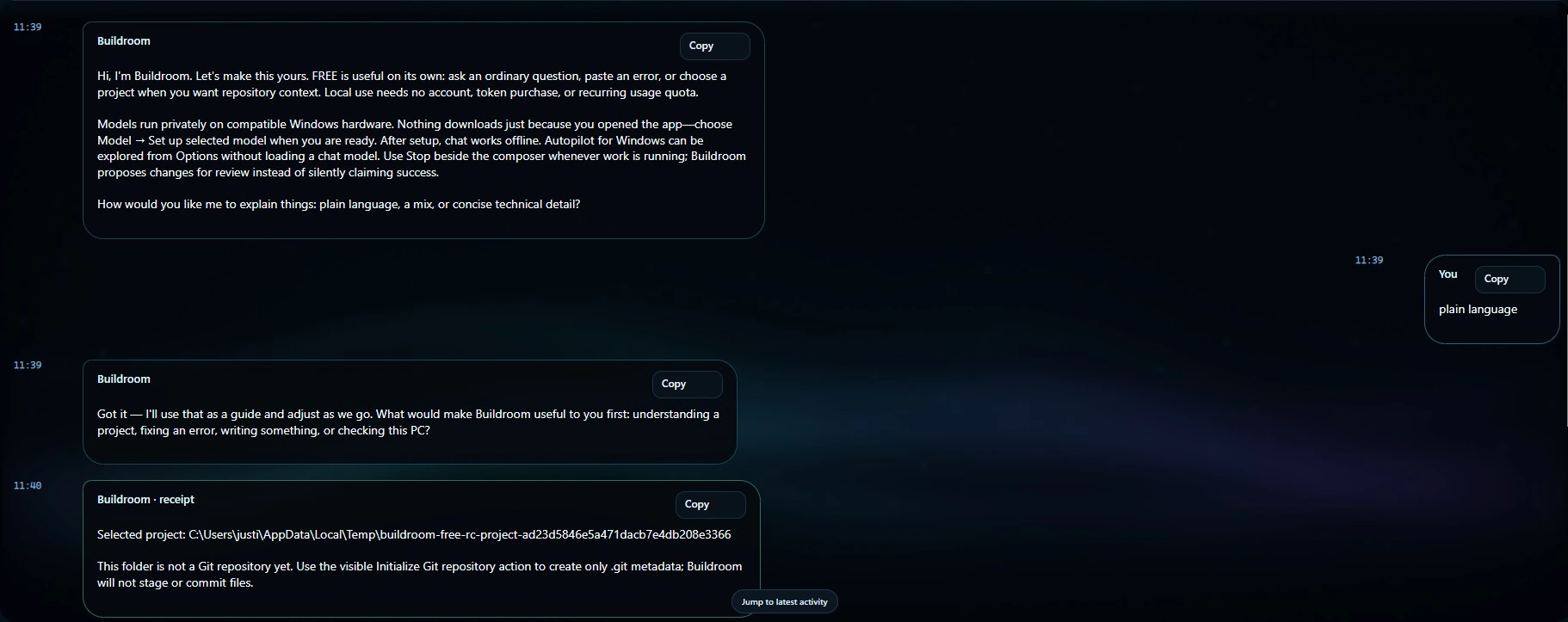
This supplied FREE EDITION capture shows the product introducing local use in plain language, asking how the person wants explanations delivered, accepting a project, and returning a visible receipt instead of pretending a non-repository is ready to commit.

Buildroom—FREE EDITION / first-run conversation Enlarge screenshot ↗ Buildroom FREE first-run chat showing a local-first introduction, the user's plain-language preference, project selection, and a receipt explaining that the selected folder is not yet a Git repository.
Local use, human-readable guidance, and a receipt. The capture shows the product stopping at the real repository state instead of staging or committing files. Open full size ↗
01 / Approachability

Plain language first.

The welcome explains local setup and asks how detailed the answers should be.

02 / Local control

Nothing downloads silently.

The person chooses when to set up a model and when to bring in a project.

03 / Receipts

The real state wins.

A non-Git folder is identified as a non-Git folder, with the next visible action explained.

Across every Buildroom edition

Buildroom’s Autopilot
for Windows.

All editions · release-specific

If you can dream it, we will help you Build it.

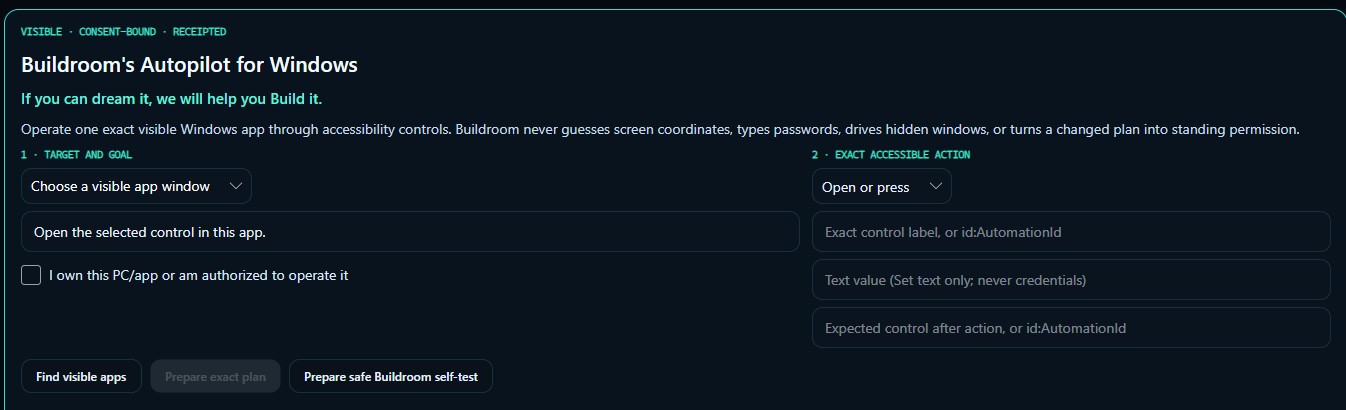
Buildroom Autopilot is the governed Windows execution layer being brought to FREE, LITE, and ADVANCED. This development screen keeps the chosen app, exact action, authorization, and expected result visible before a plan runs.

Buildroom Autopilot logo with a compass, code brackets, and the words Buildroom Autopilot — Code with Direction.
Across every Buildroom edition

Code with direction.

Autopilot is the governed Windows execution layer being brought to FREE, LITE, and ADVANCED. It keeps the visible app, exact action, authorization, and expected result in view before work runs.

Visible target Explicit permission Review before mutation Postcondition check Execution receipt
Autopilot / Windows Enlarge screenshot Buildroom’s Autopilot for Windows development screen showing a visible app selector, target and goal, exact accessible action, control label or AutomationId, expected control, and an ownership or authorization checkbox.
Development screenshot · September 2026. Interface and behavior may change. Open original
01 / Target

One visible app.

Choose the Windows app and describe the goal.

02 / Action

An exact control.

Specify the action, target control, and expected control after the action.

03 / Authorization

Your explicit permission.

Confirm that you own the PC/app or are authorized to operate it.

Across the edition family. Autopilot is planned for FREE, LITE, and ADVANCED; exact controls and availability depend on the installed release. The screenshot remains a development preview.

Buildroom FREE comparison library · September 2026

Seven ways to look at $0.

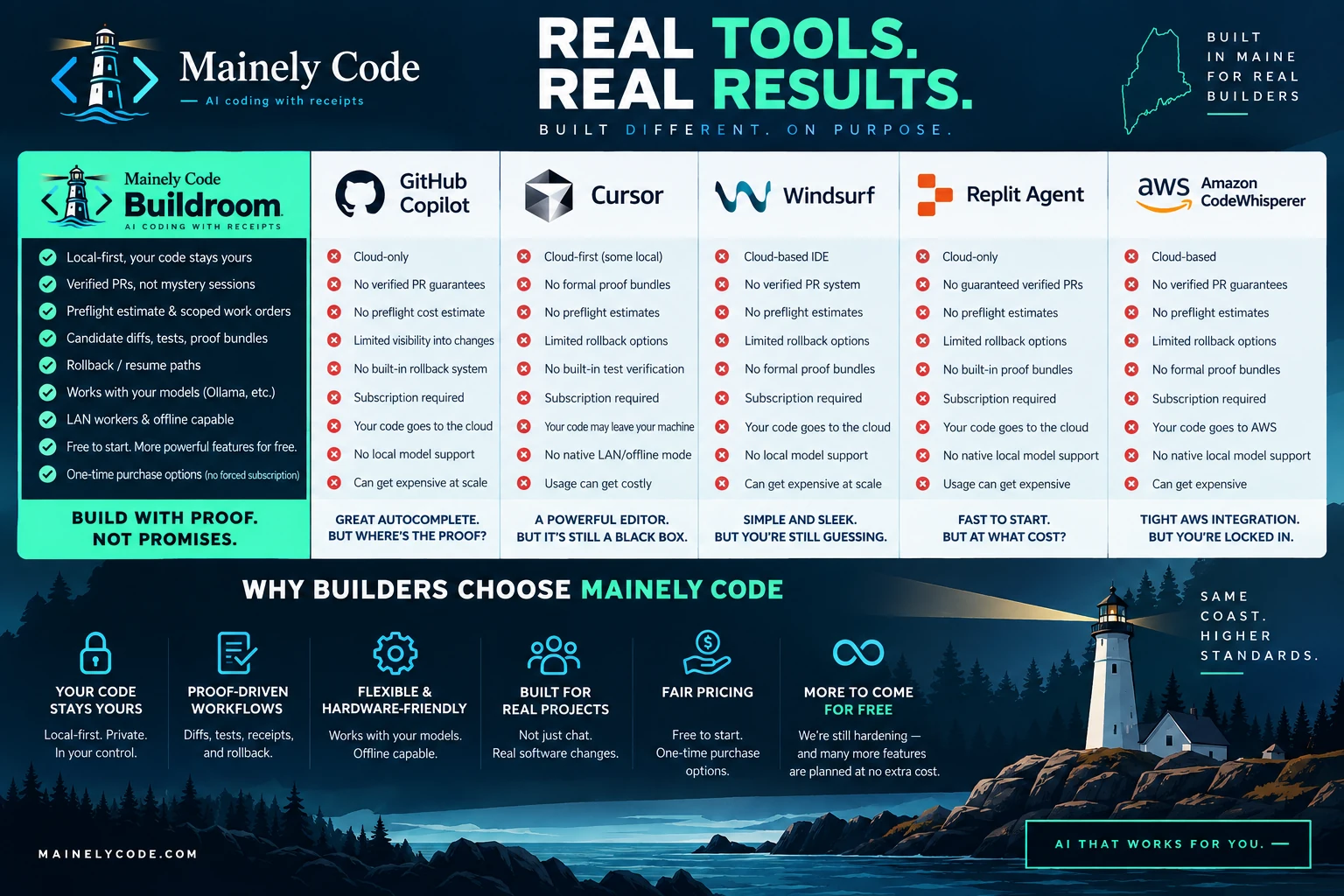
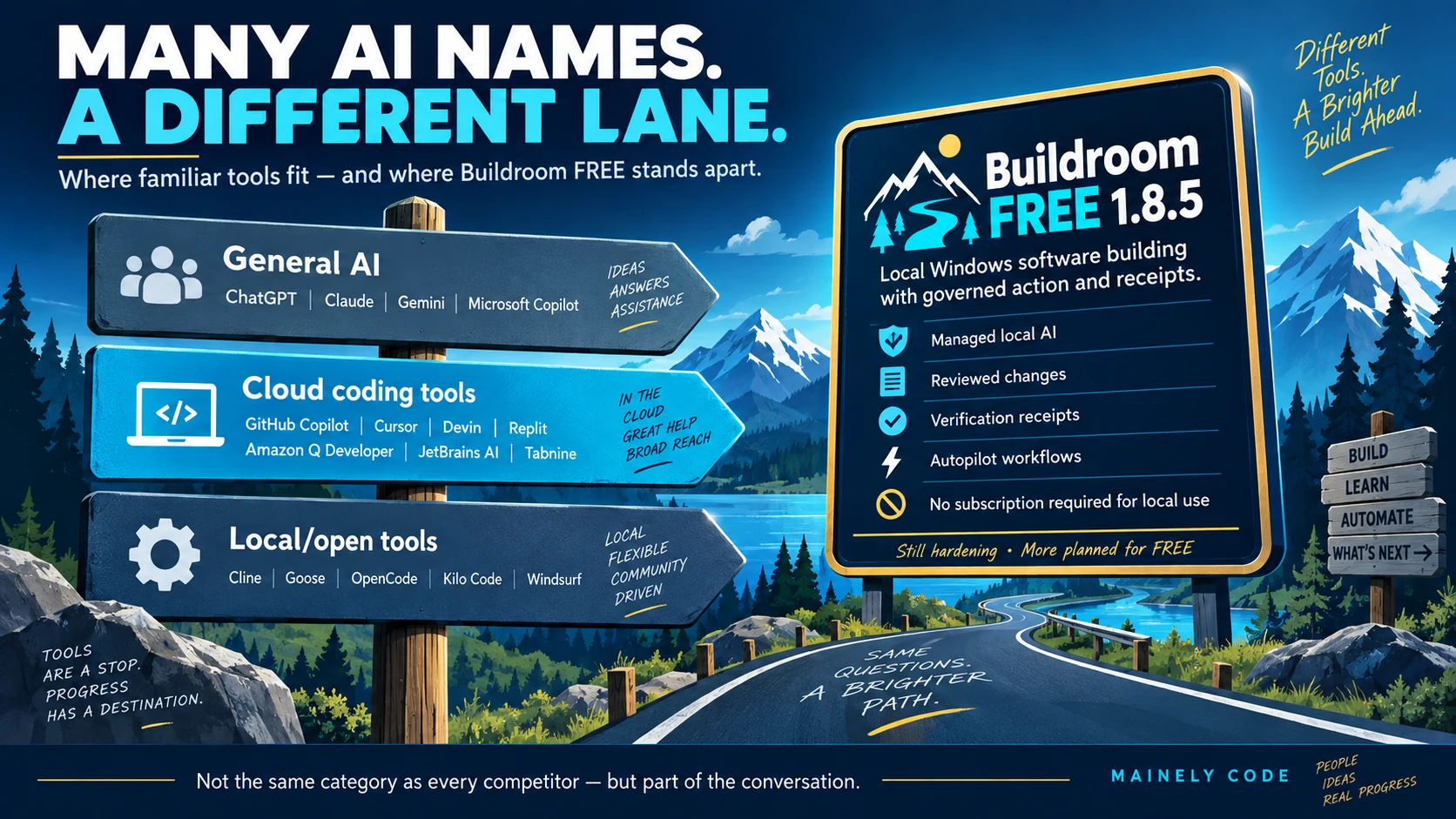
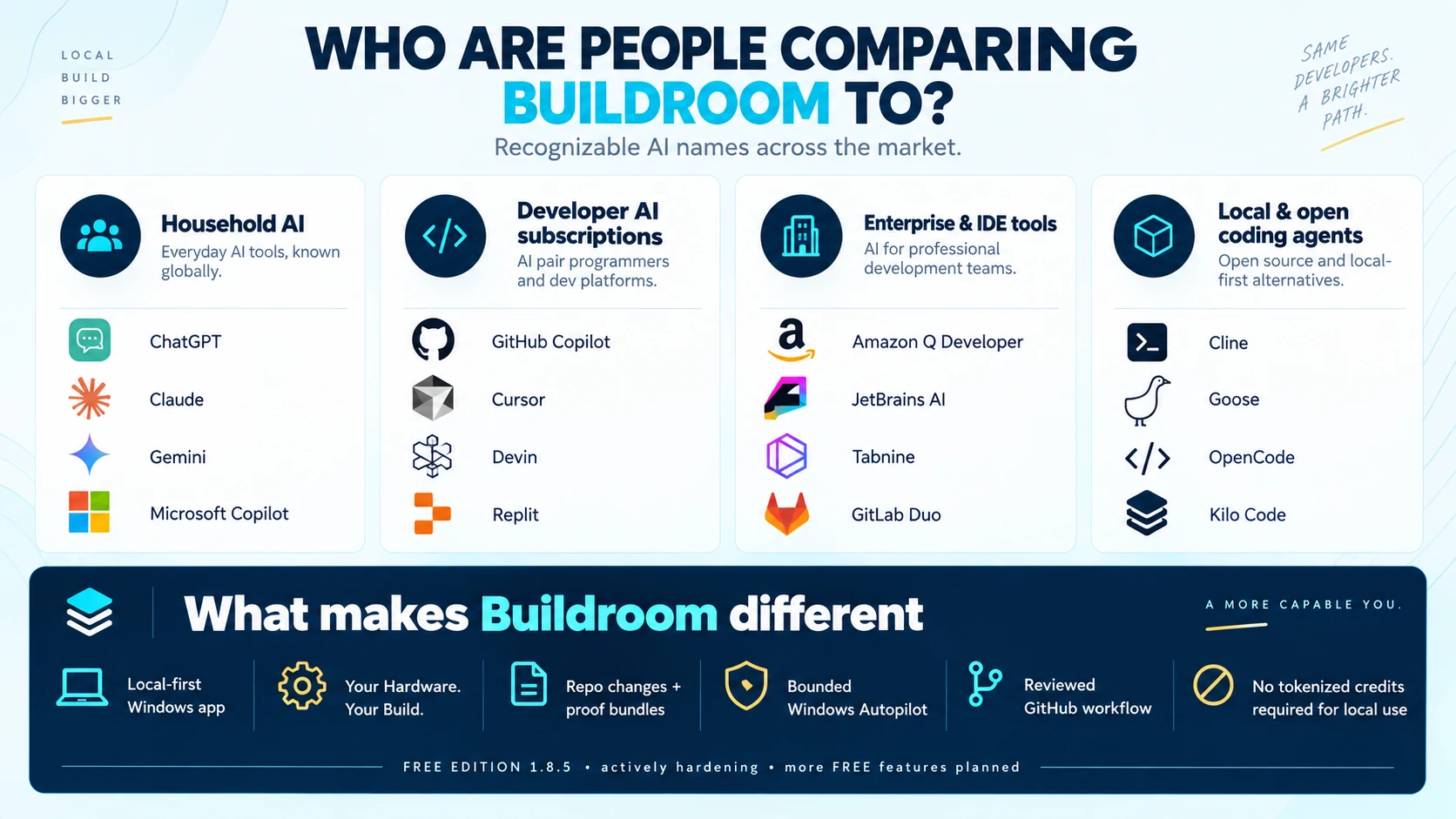
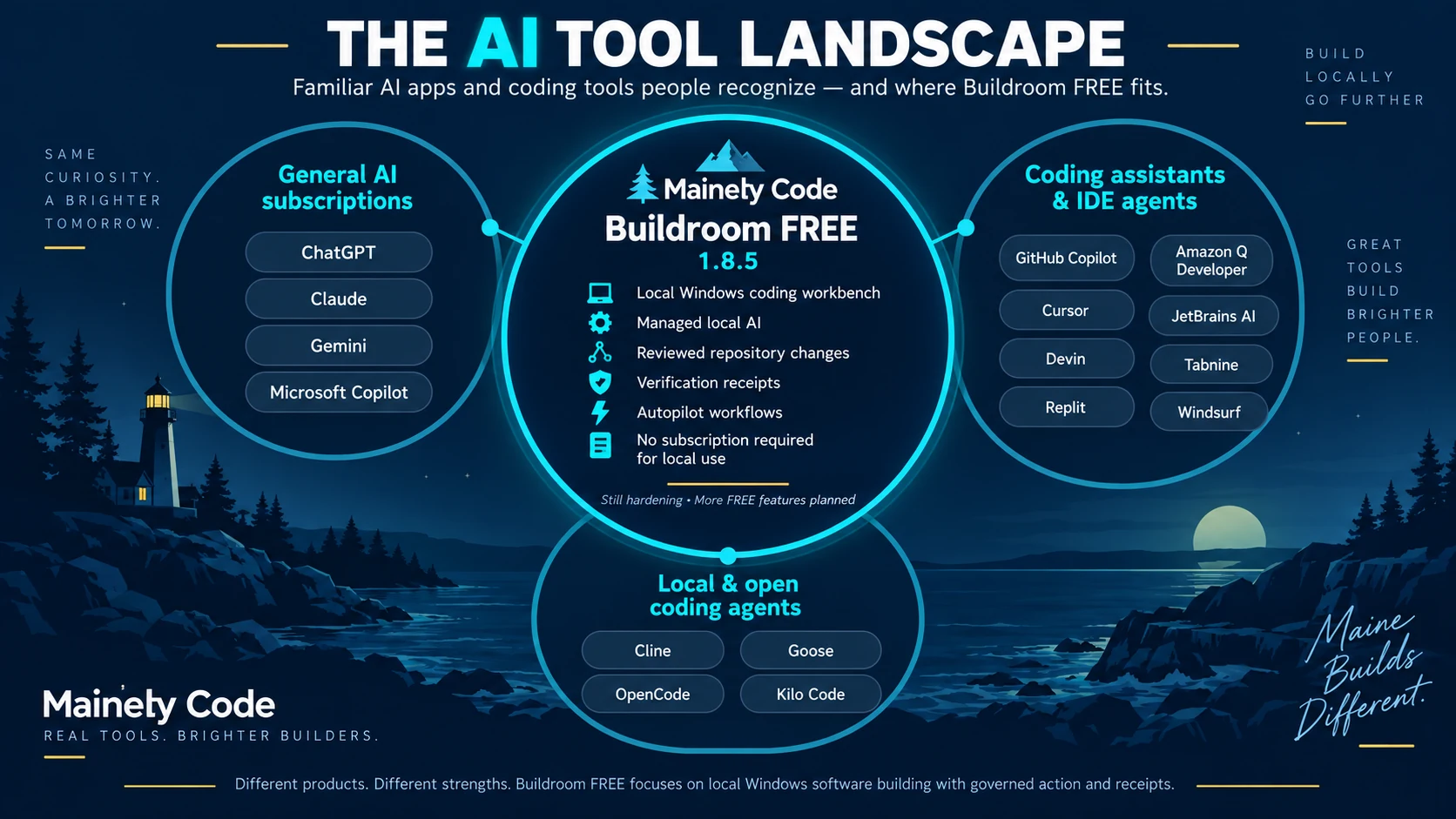
These campaign graphics approach the same question from different angles: subscriptions, familiar coding products, free agentic apps, and the wider AI-tool landscape.

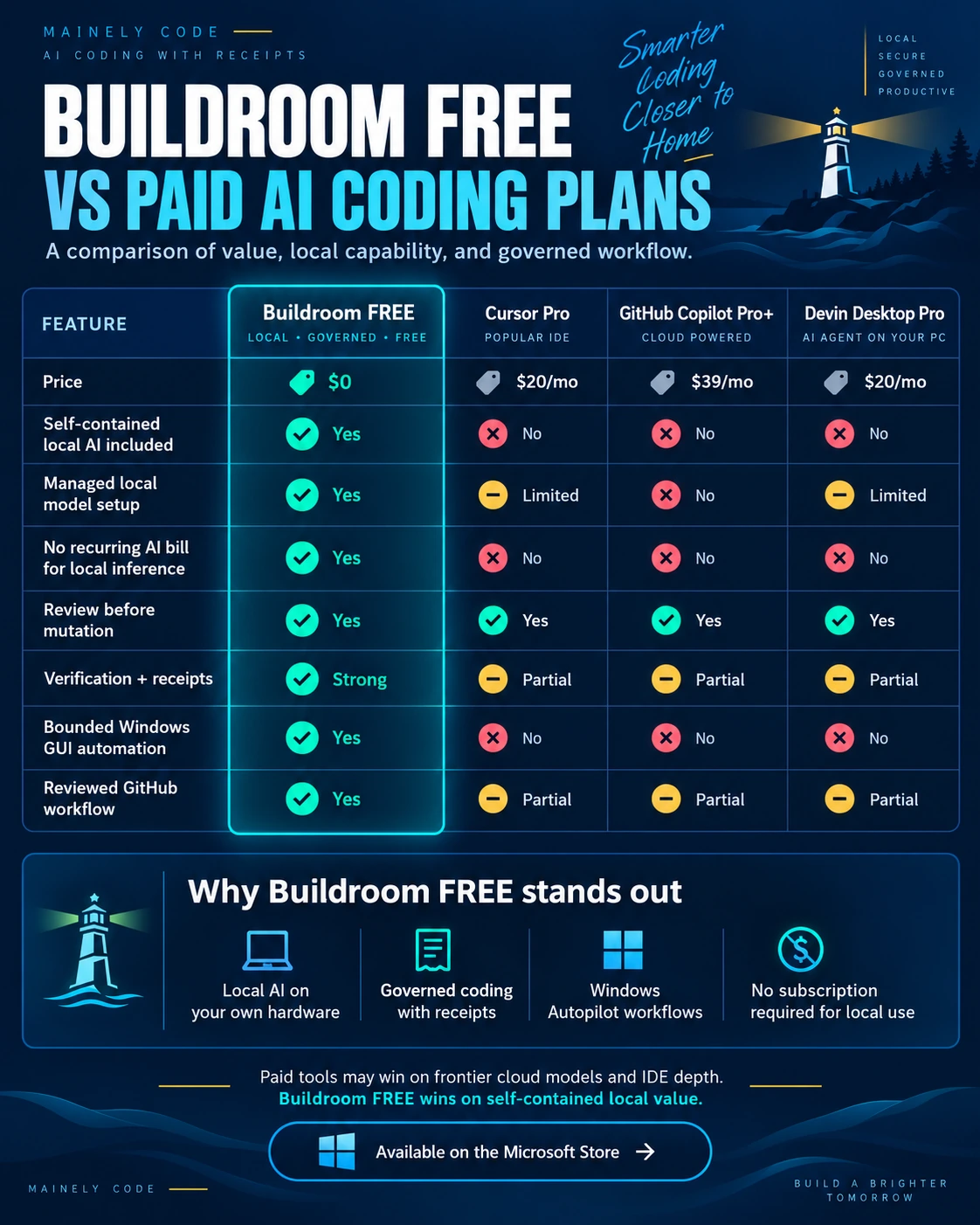
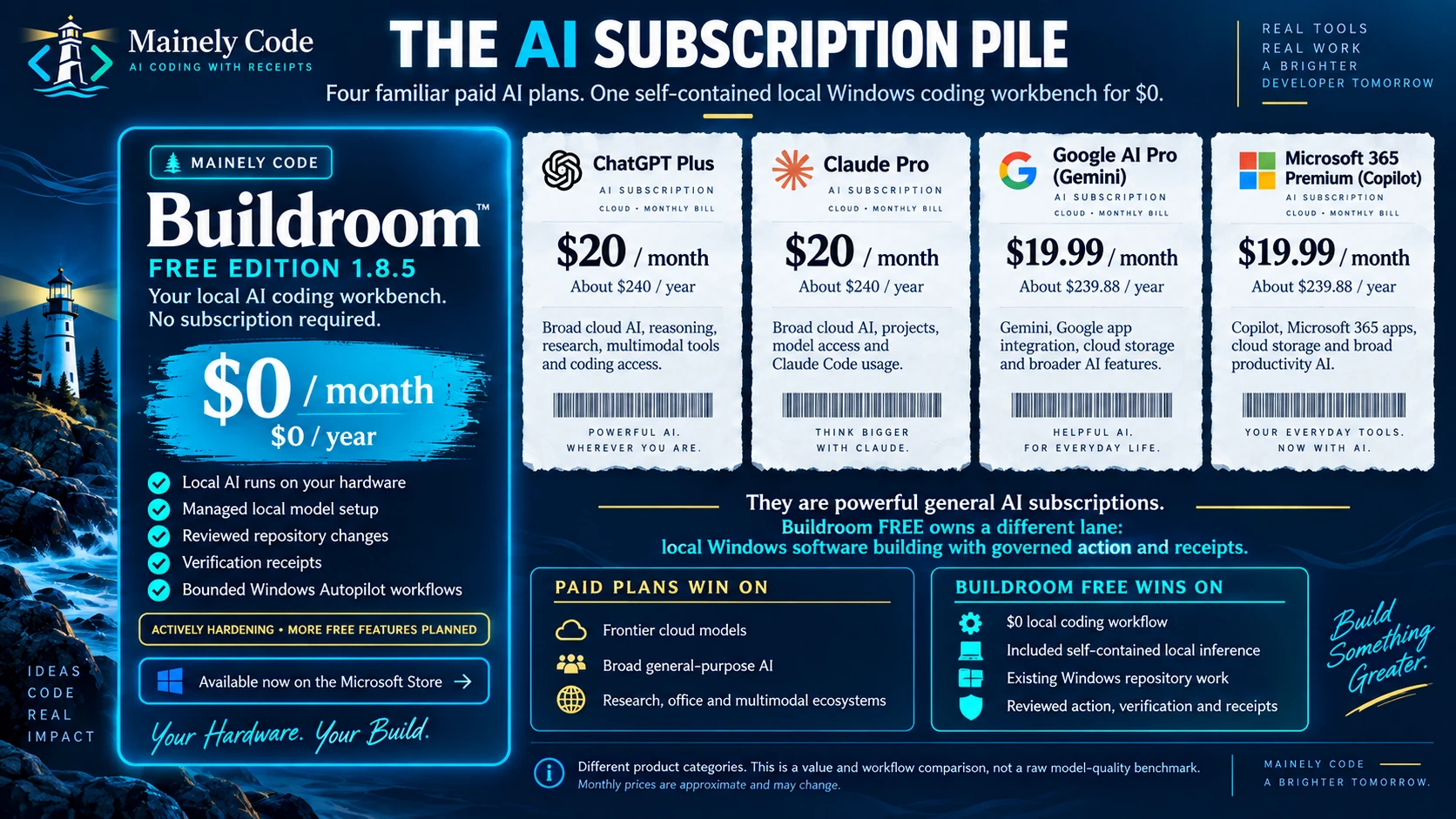
Buildroom FREE vs paid AI coding plans Enlarge comparison ↗ Comparison chart titled Buildroom FREE versus paid AI coding plans, covering price, self-contained local AI, managed setup, local inference cost, review, receipts, bounded Windows GUI automation, and reviewed GitHub workflow.
Paid-plan comparison

Buildroom FREE vs paid AI coding plans.

A feature-and-value snapshot compares price, self-contained local AI, managed setup, local inference billing, review, receipts, bounded Windows automation, and reviewed GitHub workflow.

Text summary of the graphic
  • Buildroom FREE is listed at $0 and includes self-contained local AI and managed local model setup.
  • The compared paid plans are listed with recurring monthly prices.
  • The chart marks review before mutation across the compared products.
  • It positions Buildroom receipts as strong and bounded Windows GUI automation as included.

Snapshot disclosure September 2026 snapshot. Verify current provider pricing and terms. Not a coding-quality benchmark.

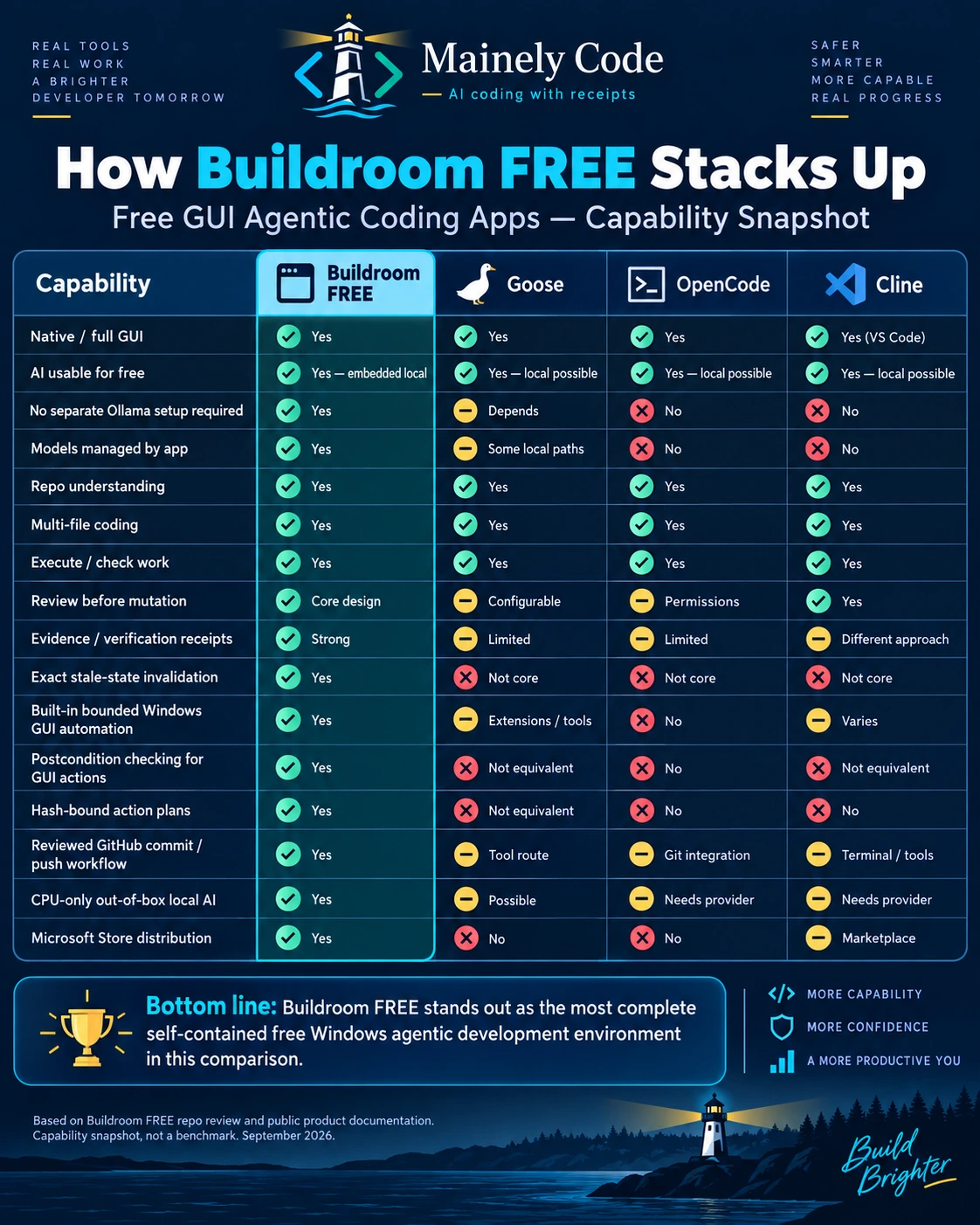
Buildroom FREE vs free GUI agentic coding apps Enlarge comparison ↗ Capability snapshot comparing Buildroom FREE with Goose, OpenCode, and Cline across local setup, repository work, verification, Windows GUI automation, GitHub workflow, CPU-only local AI, and Microsoft Store distribution.
Free-app comparison

How Buildroom FREE stacks up.

A capability snapshot compares the complete application experience: managed local AI, repository work, review, verification, stale-state protection, Windows automation, GitHub workflow, CPU-only use, and Store distribution.

Text summary of the graphic
  • All four products are shown as capable of repository understanding, multi-file coding, and executing or checking work.
  • Buildroom is distinguished by app-managed models, stale-state invalidation, hash-bound plans, and bounded Windows GUI automation.
  • The graphic characterizes GitHub delivery as built into Buildroom and available through other routes in the compared tools.
  • It shows Buildroom as CPU-capable local AI out of the box and distributed through the Microsoft Store.

Snapshot disclosure September 2026 product-positioning snapshot. Open-source projects and integrations evolve; verify current documentation.

Capability and value—not raw model IQ. These are Mainely Code campaign graphics based on a September 2026 snapshot. They are not independent benchmarks. Prices, names, ownership, integrations, plan limits, and open-source projects can change. Verify current provider information before purchasing.

The Buildroom family

Three editions. One ambition.

Start free. Grow when you are ready.
Buildroom’s next chapter starts with access—not a bigger barrier.

Next release · Microsoft Store
BUILDROOM

LITE EDITION

September 2026

Planned before the end of the month.


  • The next step in local AI engineering
  • Further upgrades follow the FREE expansion
  • Aimed at more capable PCs and larger work
  • Final capabilities and pricing at launch
Explore the LITE roadmap Not available for purchase here yet.
On the horizon · Before year-end
BUILDROOM

ADVANCED EDITION

Late fall / early winter

Planned before the end of 2026.


  • For more demanding engineering work
  • Built toward higher-capacity workflows
  • High-end hardware direction
  • Final requirements and pricing at launch
Explore the ADVANCED roadmap In development. Not a shipping feature list.

Release roadmap updated September 11, 2026. Buildroom—FREE EDITION 1.8.5 is available now with 3B, 4B, 7B, and 8B local model choices. LITE and ADVANCED remain in active development; final availability, capabilities, requirements, and pricing will be announced after release qualification.

Drone Swarm Enterprise logo showing a lighthouse coordinating five drones.
In development · ADVANCED Premium coordinated execution

Multiple concurrent jobs. One governed swarm.

Drone Swarm is planned for Buildroom—ADVANCED: coordinated, governed multi-agent execution for multiple concurrent jobs. The goal is more throughput without giving up bounded scope, visible state, review, receipts, or a safe recovery path.

Concurrent jobs Specialized workers Central governance Receipts and recovery
Start with something useful

A little help.
A lot more possible.

You do not need a grand plan. Start with a question, a small project, or that one task you keep putting off.

01

Understand the code.

Make unfamiliar projects a little less intimidating. Ask what a function does and why it works.

Explain this function in plain English. Walk me through the inputs, outputs, and possible edge cases.
02

Make a useful script.

Turn a repetitive job into a practical starting point. Read and test the result before running it.

Help me draft a PowerShell script that lists files by size. Start with a read-only version.
03

Start something new.

Give that idea a first shape: a simple page, a small component, or a front-end scaffold.

Help me create a simple HTML and CSS landing page for a local business. Keep the code easy to edit.
04

Untangle an error.

Bring a confusing error, log, or configuration. Ask better questions and find your next step.

Explain this error, identify the likely causes, and suggest the smallest safe check to try first.

Starter ideas, not guaranteed results. Review generated code and test changes before using them. Model availability and performance depend on your hardware and installed release.

Clear answers. No fine-print maze.

A few things
worth knowing.

Is FREE EDITION actually free?

Yes. Mainely Code Buildroom—FREE EDITION is available for $0 on the Microsoft Store . You do not need a paid Buildroom edition to start using it. Your PC, storage, and electricity are still your own resources.

Are 3B, 4B, 7B, and 8B all available today?

Yes. Mainely Code Buildroom—FREE EDITION 1.8.5 includes 3B, 4B, 7B, and 8B local model choices today. The best fit still depends on compatible hardware, available memory, and the task. Check the Microsoft Store listing and the installed release notes for the exact model catalog and requirements.

Will it work on my computer?

Buildroom is a Windows desktop app. Check the current Microsoft Store system requirements before installing. Model performance depends on available memory, processor, graphics hardware, and workload. Supporting an 8B model does not mean every PC can run it comfortably.

When are LITE and ADVANCED coming?

LITE and ADVANCED are in active development. Their public availability, final capabilities, hardware requirements, and pricing will be announced only when their respective release qualification is complete. The current Microsoft Store product available today is Buildroom—FREE EDITION 1.8.5.

If you can dream it, we will help you Build it.

Start with FREE EDITION. See what you can make with local AI at your side.